E-Commerce Integration
E-Commerce Integration enables suppliers to initiate a Capricorn-hosted checkout journey from their e-commerce application using Payment Intent.
The integration supports hosted checkout, member identity handover, and final transaction submission using the original cartId.
What E-Commerce Integration covers
| Capability | Summary | Primary document |
|---|---|---|
Payment Intent | Submit the transaction and callback details required to initiate the Capricorn-hosted checkout journey and receive the hosted payment URL. | Payment Intent |
| Member Identity Handover | Support the transfer of authenticated Capricorn member context between myCAP and the supplier application when applicable. | Member Identity Handover |
| Final Transaction Submission | Following a successful hosted checkout, submit the final transaction using the original cartId. | Post Transaction (Deprecated) |
| Post Cart Transaction | Submit an E-Commerce transaction associated with an existing cart. | Post Cart Transaction reference |
Recommended E-Commerce journey
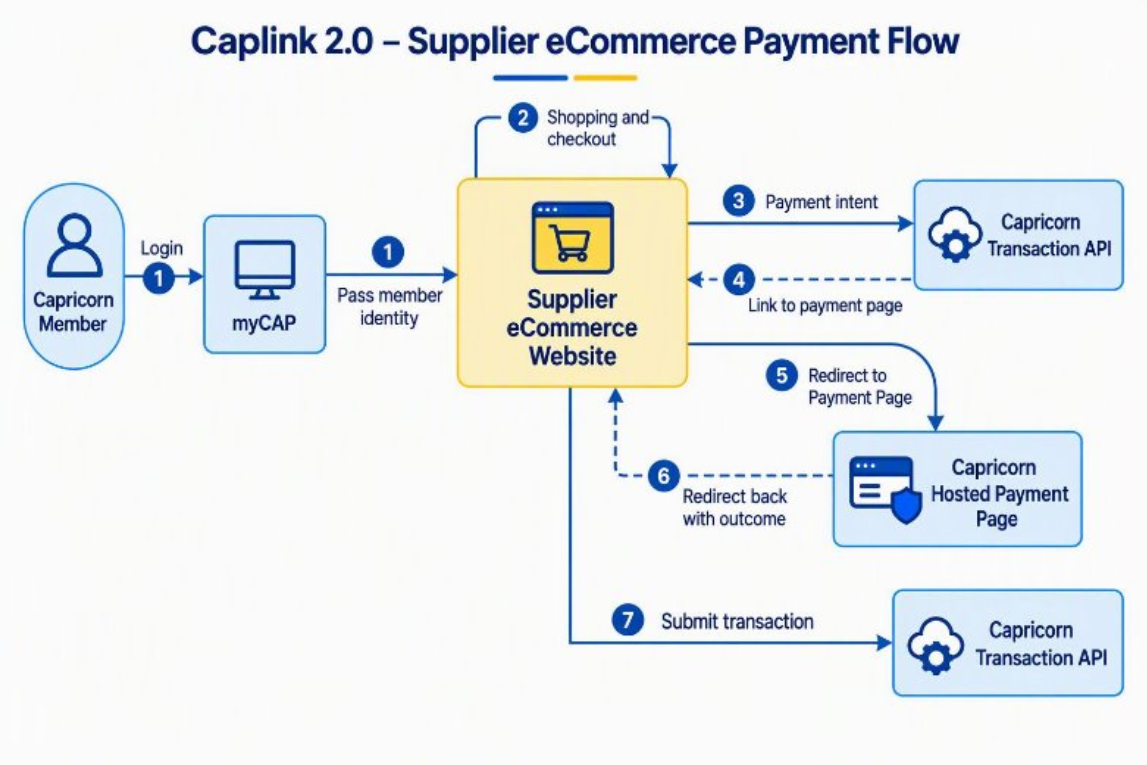
Text description of the E-Commerce payment flow
- A Capricorn member logs in through myCAP, which passes their identity to the supplier's E-Commerce website.
- The member shops and checks out on the supplier's website.
- The supplier's website sends a Payment Intent to the Capricorn Transaction API.
- The API returns a link to the hosted payment page to the supplier's website.
- The supplier's website redirects the member to the hosted payment page.
- The hosted payment page redirects the member back to the supplier's website with the outcome.
- After a successful checkout, the supplier's website submits the transaction to the Capricorn Transaction API.
Suppliers should retain the original state value and cartId from Payment Intent creation, validate the returned state after the callback, and submit the final transaction through Post Transaction only after a successful hosted checkout.
Related links
- Payment Intent reference
- Member Identity Handover
- Post Direct Transaction
- Authentication and Authorization
- Security
Tip: Review the Member Identity Handover requirements where the journey begins from myCAP.